
C Program to Compute Quotient and Remainder

C Program to Compute Quotient and Remainder

This program evaluates the quotient and remainder when an integer is divided by another integer.
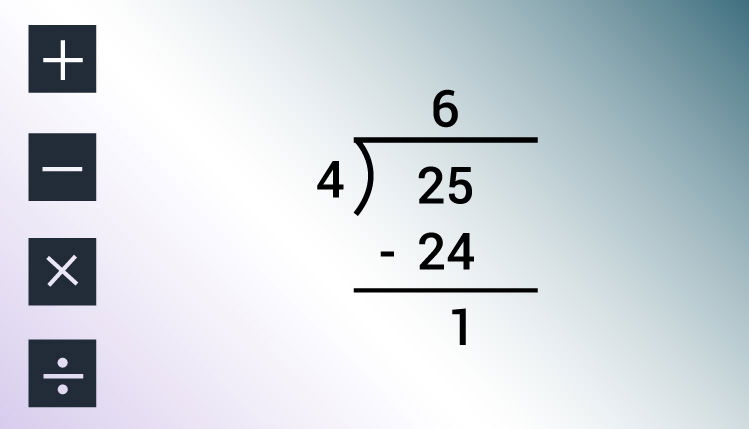
 
Remainder and quotient calculation
To understand this example, you should have the knowledge of following C programming topics:

Program to Compute Quotient and Remainder

#include <stdio.h>
int main(){

    int dividend, divisor, quotient, remainder;

    printf("Enter dividend: ");
    scanf("%d", &dividend);

    printf("Enter divisor: ");
    scanf("%d", &divisor);

    // Computes quotient
    quotient = dividend / divisor;

    // Computes remainder
    remainder = dividend % divisor;

    printf("Quotient = %d\n", quotient);
    printf("Remainder = %d", remainder);

    return 0;
}
Output
Enter dividend: 25
Enter divisor: 4
Quotient = 6
Remainder = 1
In this program, user is asked to enter two integers (dividend and divisor) which is stored in variable dividend and divisor respectively.
Then the quotient is evaluated using division / operator and stored in variable quotient.
Similarly, the remainder is evaluated using modulus % operator and stored in remainder variable.
Finally, the quotient and remainder are displayed using printf() function.

Comments

Popular posts from this blog

C Program to Check Whether a Number is Positive or Negative

C Program to Check Whether a Number is Positive or Negative In this example, you will learn to check whether a number (entered by the user) is negative or positive.    To understand this example, you should have the knowledge of following C programming topics: C Programming Operators C if...else Statement This program takes a number from the user and checks whether that number is either positive or negative or zero. Example #1: Check if a Number is Positive or Negative Using if...else #include <stdio.h> int main () { double number ; printf ( "Enter a number: " ); scanf ( "%lf" , & number ); if ( number <= 0.0 ) { if ( number == 0.0 ) printf ( "You entered 0." ); else printf ( "You entered a negative number." ); } else printf ( "You entered a positive num...

C Program to Print an Integer (Entered by the User)

C Program to Print an Integer (Entered by the User) In this program, integer entered by the user is stored in a variable. Then, that variable is displayed on the screen using printf() function.   To understand this example, you should have the knowledge of following C programming topics: C Programming Constants and Variables C Programming Data Types C Input Output (I/O) Program to Print an Integer #include <stdio.h> int main () { int number ; // printf() dislpays the formatted output printf ( "Enter an integer: " ); // scanf() reads the formatted input and stores them scanf ( "%d" , & number ); // printf() displays the formatted output printf ( "You entered: %d" , number ); return 0 ; } Output Enter a integer: 25 You entered: 25 In this program, an integer variable  number is declared. ...

C Program to Swap Two Numbers

C Program to Swap Two Numbers This example contains two different techniques to swap numbers in C programming. The first program uses temporary variable to swap numbers, whereas the second program doesn't use temporary variables.   To understand this example, you should have the knowledge of following C programming topics: C Programming Data Types C Programming Operators C Input Output (I/O) Example 1: Program to Swap Numbers Using Temporary Variable #include <stdio.h> int main () { double firstNumber , secondNumber , temporaryVariable ; printf ( "Enter first number: " ); scanf ( "%lf" , & firstNumber ); printf ( "Enter second number: " ); scanf ( "%lf" ,& secondNumber ); // Value of firstNumber is assigned to temporaryVariable temporaryVariable = firstNumber ; // Value of secondNumber...